
Training delivered.
What changed
in the work?
Gather useful feedback, review workplace application and decide what support the next attempt needs.
Three editable CSV worksheets. Open in Excel or Google Sheets.

“What did you try, and what evidence can we review?”
Three questions.
Different evidence.
A fictional delegation-workshop example. Keep feedback, application and results separate.
FROM THE TRAINING ROOM
“Was the session useful?”
Feedback helps improve the session. It does not establish workplace application.
IN THE WORK
An opportunity to delegate.
Review a suitable example against the agreed criteria: owner, deadline and definition of done.
AT THE FOLLOW-UP
Make the next attempt better.
Record the attempt and the evidence. Agree the next support action.
Illustrative example. An attempt does not establish lasting behaviour change.
Plan it. Ask it. Review it.
Start with the decision.
Agree the action, evidence, owner and review opportunity before collecting responses.
Agree an owner, deadline and definition of done when delegating.
A redacted task brief reviewed against those three criteria.
Improve the learning experience.
What was useful? What needs clarification?
Improving delivery and identifying support needs. Session ratings alone do not prove application.
Review what happened at work.
Invited participants, responses, eligible opportunities and reviewed examples.
What support to change, who owns it and when to review again.
Keep coverage
in the picture.
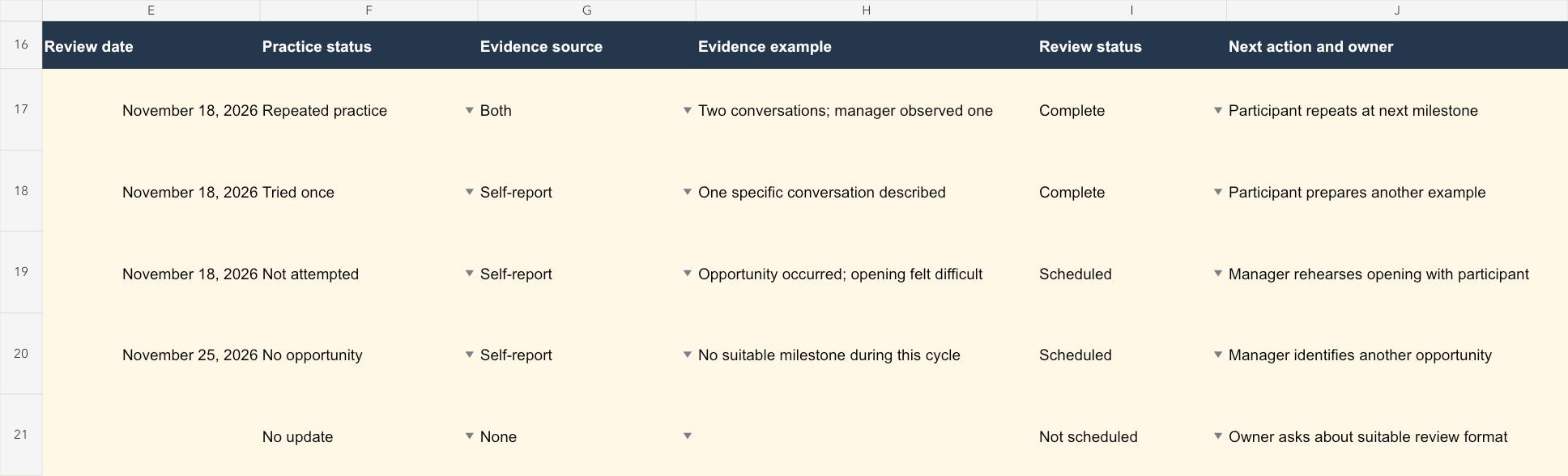
Use the application-review worksheet to keep respondents, opportunities and reviewed examples separate.
Choose what you need next.
A few practical answers.
What is included in the download?
An evaluation-plan worksheet, session-feedback worksheet and application-review worksheet, plus a worked example. These are editable CSV files.
Do we need a GWork account?
No. Open and edit the worksheets in Excel or Google Sheets. These are planning aids, not validated questionnaires.
What can these worksheets tell us?
They help organise session feedback and evidence of workplace application. Keep response coverage, practice opportunities and evidence sources visible. They do not establish that training caused business results or calculate training ROI.
Must we follow the 30-day schedule?
No. Choose review dates around real opportunities to practise. If a session has already happened, start with the next opportunity and label recalled starting points as retrospective.
Make the next review useful.
Choose the decision first. Then choose the worksheet and the evidence.