
Post-training
action plan.
Make learning
part of the work.
Turn one learning session into a specific workplace action. Use the free plan, manager briefing and Excel tracker to organise practice and follow-up.
Free ZIP download: editable worksheets + Excel tracker. No signup required.

“At Tuesday’s review, I’ll give one specific observation.”
One skill.
Watch it become an action.
A fictional feedback-training example. Choose a step to see what changes.
FROM THE TRAINING ROOM
“Give better feedback.”
A useful intention needs a moment to happen.
IN THE WORK
Tuesday. Project review.
The manager helps rehearse the opening. The learner tries the action.
AT THE FOLLOW-UP
Make the next attempt better.
Record the attempt and the evidence. Agree the next support action.
Fictional example. This is a participant report, not independent observation or proof of lasting change.
Useful tools. A clear place to start.
Make the commitment specific.
Illustrative feedback-training example from the kit.
“I’ll communicate better.”
“At the next project review, I’ll discuss one specific observation and ask for the colleague’s perspective.”
Ask for support someone can give.
A short briefing helps the manager understand the action and their role.
Help the participant rehearse the opening of the conversation.
Ask what they tried, what happened and what they need next.
Includes a manager briefing and four adaptable follow-up messages.
See the gaps before drawing conclusions.
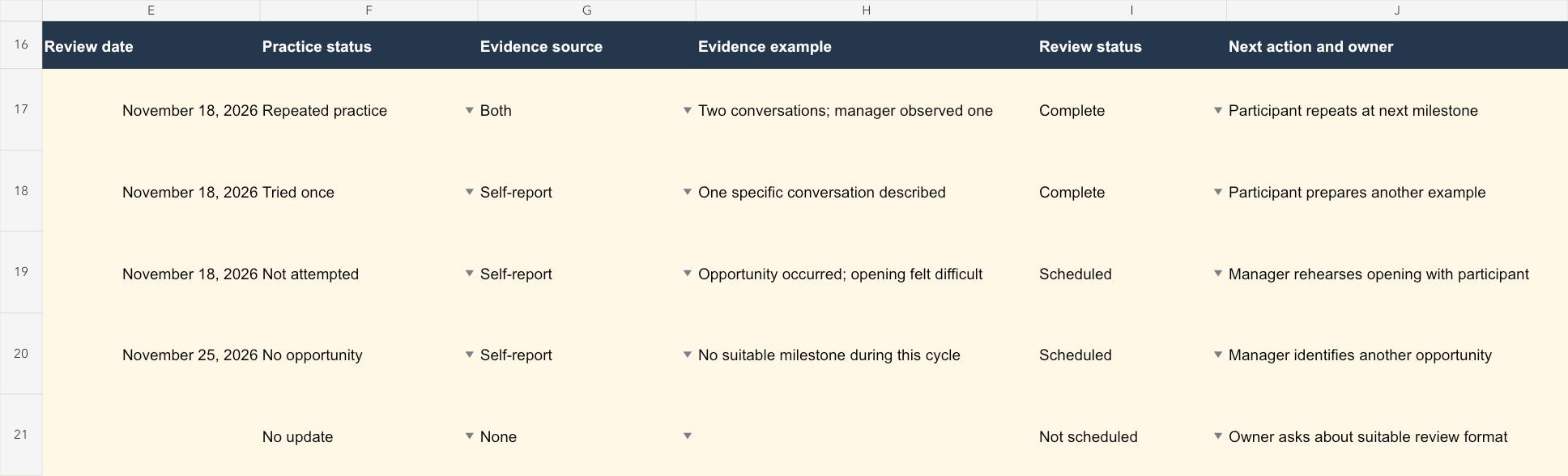
Keep the cohort’s practice status and evidence source separate.
No update · No opportunity · Not attempted · Tried once · Repeated practice
Self-report · Observation · Both · None
Repeated practice is not proof of a lasting habit. The guide explains how to report the limits.
A clear view of
what happened.
The Excel tracker separates practice status from evidence. Missing updates stay visible.
Plan the action.
Then review its use.
Start with the kit. After a real opportunity to practise, choose your questions and organise the evidence for a useful review.
A few practical answers.
What’s included in the download?
A ZIP containing a start-here guide, the learning-to-practice guide, an action-plan worksheet and an Excel tracker. The guide includes behaviour examples, a facilitator closing script, manager briefing, four follow-up messages and a review/report template. The written worksheets are editable Markdown text files; the tracker is an .xlsx workbook.
Do we need a GWork account?
No. Use the editable resources manually with your existing documents, spreadsheets and messaging tools. The kit does not send automated reminders.
What does the tracker actually measure?
Reported practice, evidence sources and completed review conversations. It distinguishes missing updates and lack of opportunity from reported attempts. It does not establish that training caused a business outcome or that a lasting habit formed.
Must we follow the 30-day schedule?
No. Choose review dates around real opportunities to practise. If a session has already happened, start with the next opportunity and label recalled starting points as retrospective.
Leave the session with a plan.
Choose one workplace action, agree the manager’s support and plan a review around a real chance to practise.